How it works

Four steps.
The assistant owns two.

From a stranger on your pricing page to one of your people on camera, in about forty seconds. The AI handles the introduction. A human handles the part that decides whether they buy.

01The four steps

Forty seconds, in order.

01

Someone lands on your page

They found you at 9pm. They’re not going to fill in a form and they’re not going to call. The chat sits in the corner and nothing has interrupted them. If you want, it can open itself after a delay, or once someone has scrolled far enough down a page that matters.

02

The assistant asks who they are

Name, what they’re after, how soon. It answers the easy things and it never pretends to be one of your people. That’s the whole of its job. It asks for a name first, so whoever joins already knows who they’re talking to.

03

Your rep shows up

In your inbox, or as a message to their phone if they’re out. One tap and they’re in. You can see the page the visitor is on, their name and email, and everything already said, before you say a word.

04

They’re just talking

Face, voice, and your screen if you need it, down the side of the page they were already reading. No download, no meeting link, no calendar invite. Camera stays optional for both sides.
02The real thing

Not a mockup. This is the product.

Every screen below is the real thing, photographed. The chat on this site is the same one your visitors get.

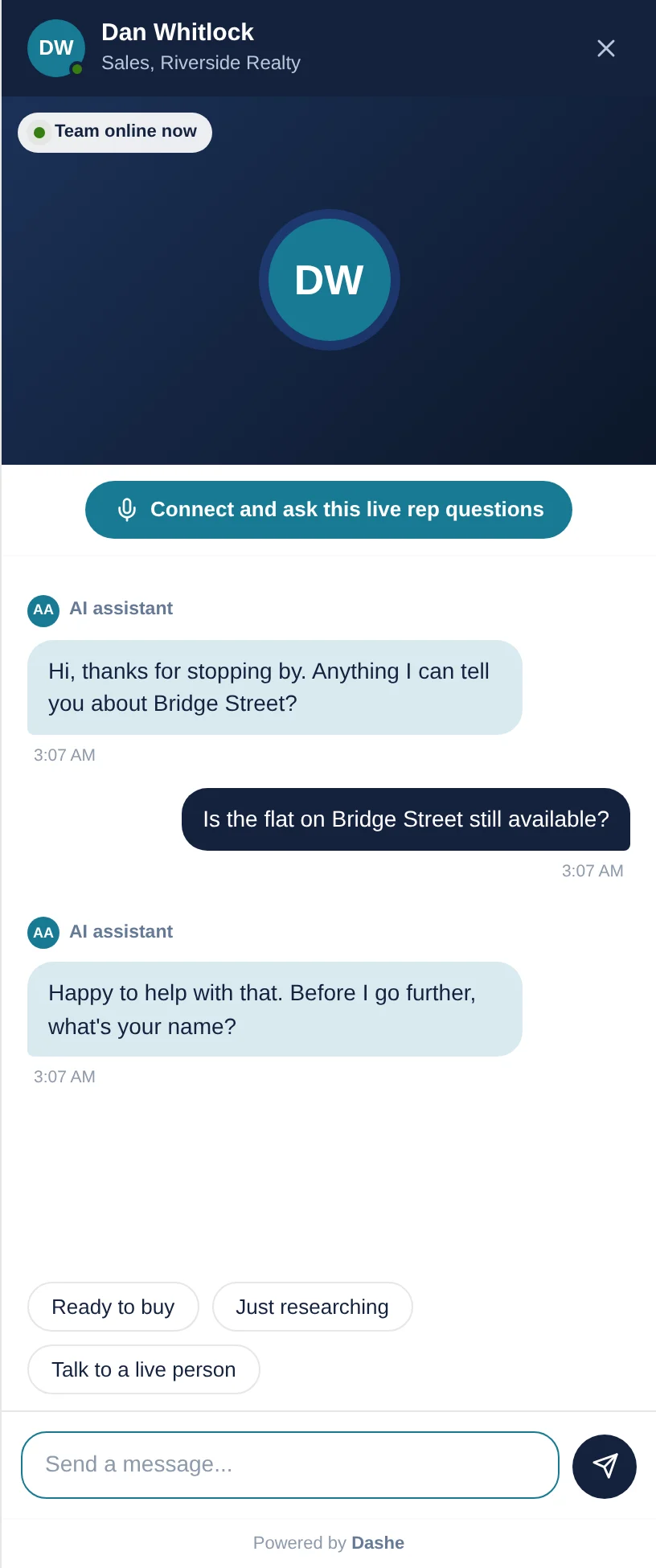
The Dashe assistant asking a website visitor for their name before handing the conversation to a rep
The assistant, qualifying

It asks for a name first, so whoever joins already knows who they’re talking to.

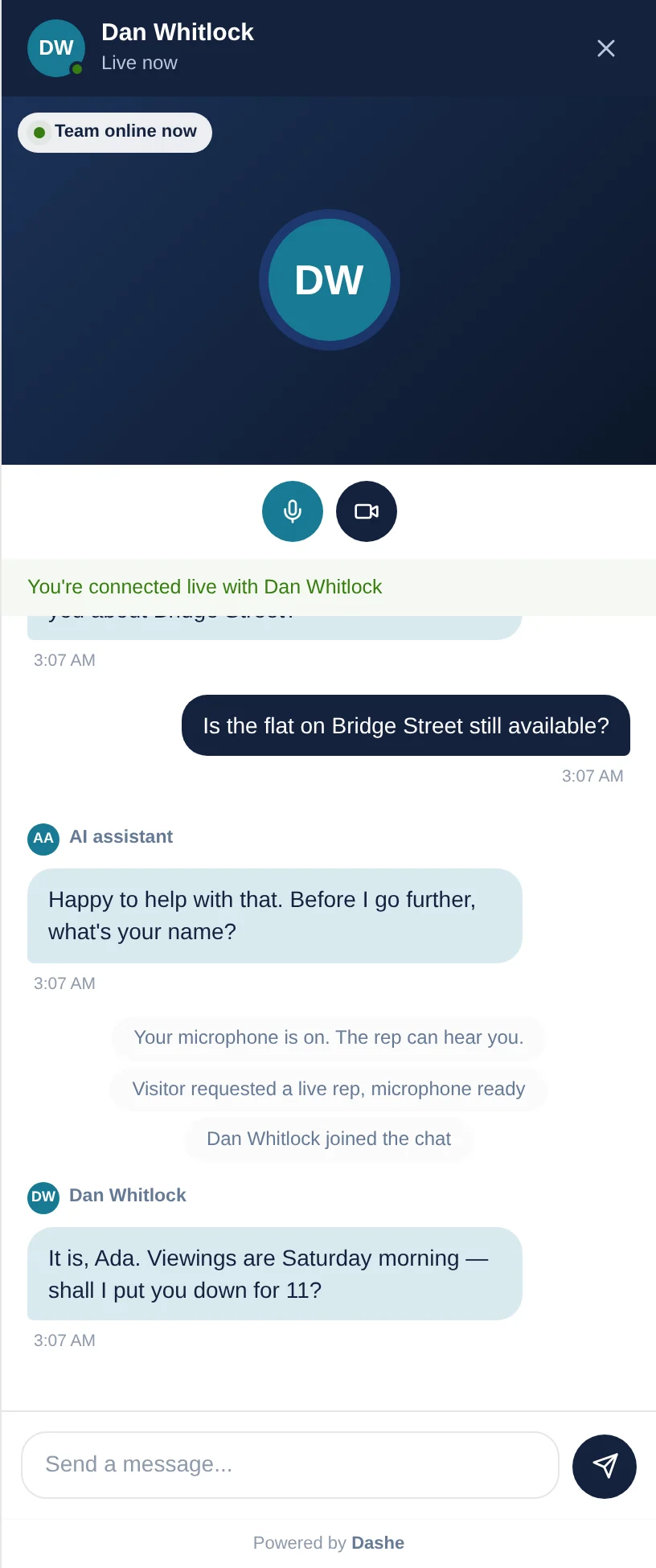
A live Dashe conversation between a website visitor and a named rep, in a panel down the side of the page
A person, live

Your rep joins the same panel. Nothing for the visitor to install.

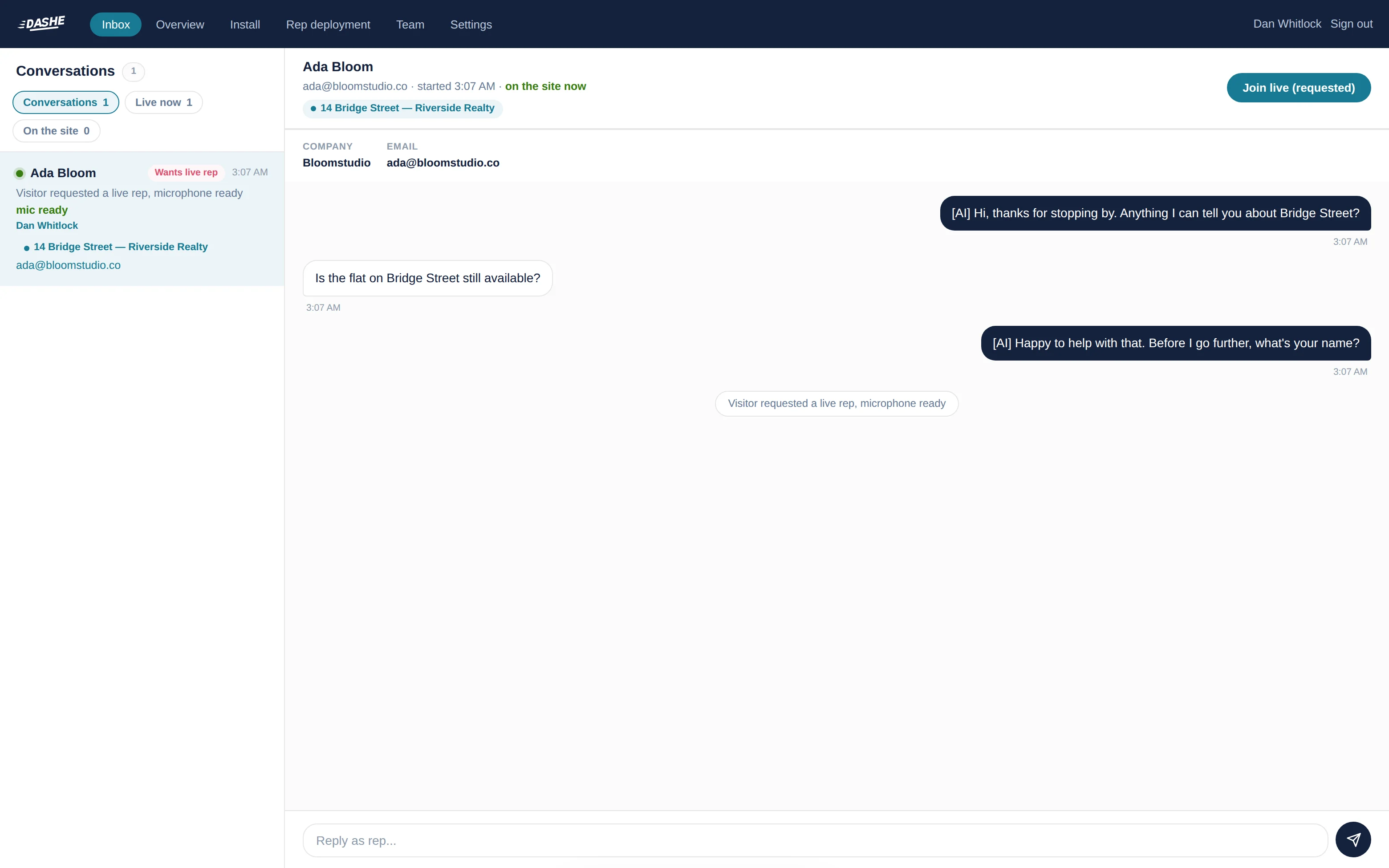
The Dashe inbox showing a visitor waiting for a person, the page they are reading and their contact details
Your inbox

Who’s on the site right now, the page they’re reading, and what they’ve already said. Green means they’re still there.

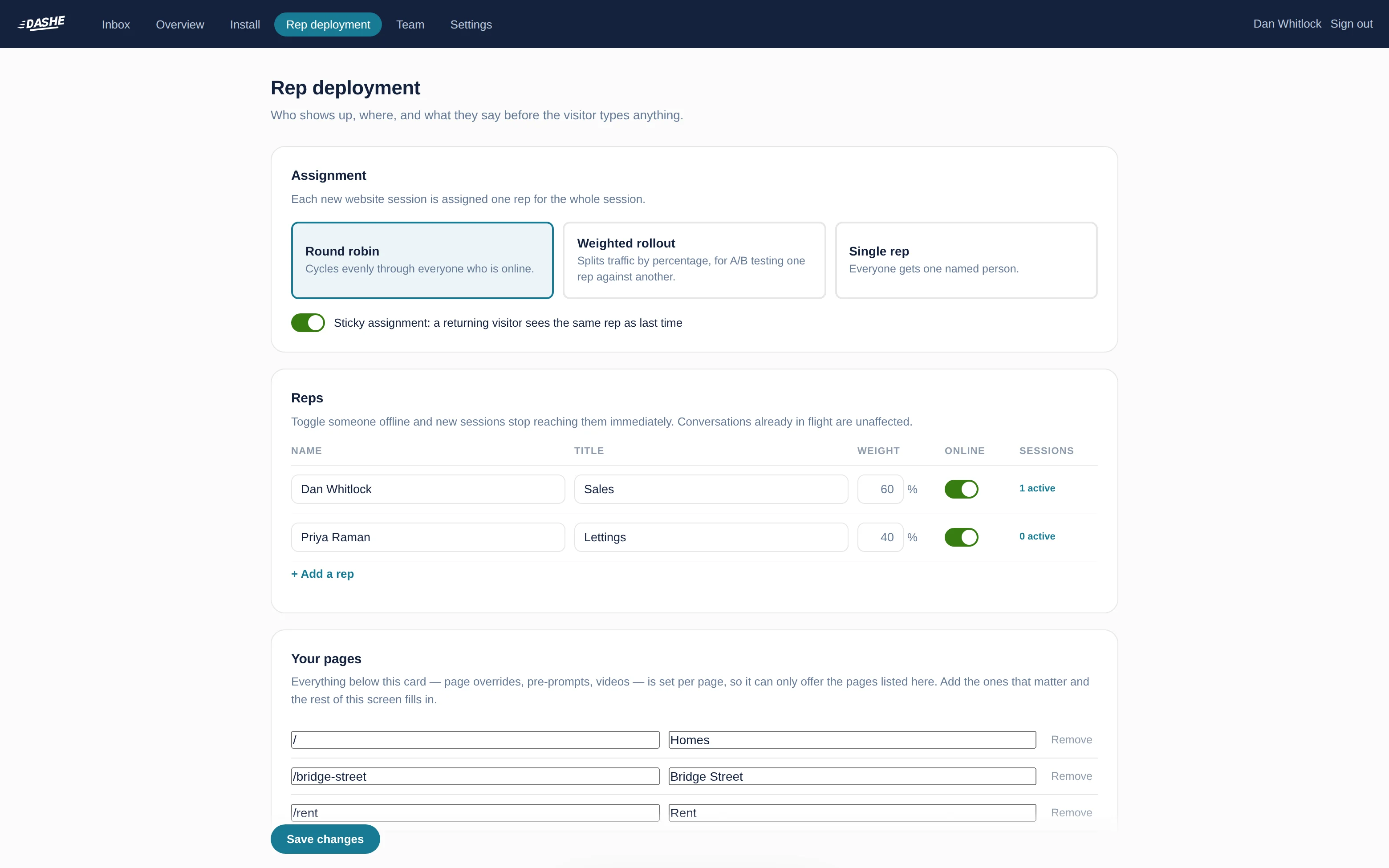
Dashe settings for assigning reps to pages and writing each rep's opening message
Who shows up, and where

Split the traffic between your team, or send the pricing page to the person who knows pricing.

03The call itself

Where the video goes.

Straight between the two browsers. The picture and the sound go directly from your rep’s computer to the visitor’s. They never touch our servers.

That’s worth knowing for two reasons. It’s why the call starts in seconds instead of spinning up a meeting room. And it’s the answer to the first question your IT people are going to ask.

The video

Browser to browser. Never through us.

Camera

Optional, both sides, every time.

If the mic fails

It carries on as text, and says so.

Where it runs

Only on the sites you named.

If your IT team asks

It’s WebRTC, peer to peer. We carry the signalling that introduces the two browsers and the text of the conversation; the media itself never reaches us. On locked-down corporate networks a relay is sometimes needed for two browsers to reach each other at all, and we support one.

04Who answers

Deciding who shows up.

It’s a setting, not a queue you have to sit and watch.

How Dashe sends a conversation to a rep
RuleWhat it doesGood for
Take it in turnsEach new conversation goes to the next person who’s online.A team who all sell the same thing.
Split by percentageWeight the share each person gets, in whatever proportion you set.Mixing a senior closer with someone newer.
One named personEverything goes to a single rep.Working on your own, or a stand-in week.
By pageSend a particular page to the person who owns it.Pricing questions going to whoever knows pricing.
Same person as last timeSomeone who comes back gets the rep they already spoke to.Anything people think about before buying.
Nobody onlineThe assistant keeps going and takes their details.Evenings and weekends.
05Away from a desk

When your rep is out.

The people who most need this are rarely sitting down. An agent is out on viewings. A showroom manager is on the floor. A broker is on the phone.

So they can link their phone, and when a visitor asks for a person a WhatsApp message reaches them wherever they are. They reply to it the way they reply to any other message, and the answer lands in the visitor’s browser, in the panel they’re still looking at. No app, no dashboard, no getting back to a laptop.

06Questions

The things people actually ask.

How long does it take for a rep to reach a visitor?

About forty seconds from the visitor’s first message, and most of that is the assistant’s questions. Once your rep taps to join, the connection itself takes a few seconds.

Does the video go through Dashe's servers?

No. The picture and the sound go straight between the visitor’s browser and your rep’s. We carry the text of the conversation and the bit that introduces the two browsers to each other, but never the video itself.

If your IT team asks: it’s WebRTC, peer to peer.

Does the rep have to be on camera?

No. Camera is optional for both sides, every time. Your rep can answer on voice only, or keep typing, and so can the visitor. If a microphone can’t be reached the conversation carries on as text, and the panel says so rather than failing quietly.

How does Dashe decide which rep gets the conversation?

You choose: take it in turns, split by percentage, or name one person. You can also send a particular page to a particular rep, so pricing questions go to whoever knows pricing. Someone who comes back gets the person they spoke to last time.

Can a rep answer from their phone?

Yes. They link a handset, and when a visitor asks for a person a WhatsApp message reaches them wherever they are. Their reply lands back in the visitor’s browser.

What does the AI assistant actually do?

It greets the visitor with an opening line you write, asks their name, works out what they’re looking into, and answers what it can from what you’ve told it about the business. It’s told never to invent a price or a promise, and never to claim to be one of your team. The moment someone shows they’re serious, or asks for a human, it hands over.

07Read on
Last thing

You’ll know within an hour whether it’s worth keeping.

Try Floor free See plans